
December 2025
Introduction
Live Connection in Seamless Planning – What is it?
This blog provides a good overview of Seamless Planning:
Understanding Seamless Planning
Live Connection in Seamless Planning allows you to link additional tables/views to your plan figures without copying them into the data model with the plan data. This functionality is described very well in the following blog post by Maximilian Gander:
Unlocking the Next Chapter of Seamless Planning in SAP Business Data Cloud with Live Versions
There is also an excellent training course/demo on this topic, which was presented at TechEd 2025. The link to this training course and other highlights can be found in this blog:
TechEd 2025 in Berlin – Recap on planning in SAP Business Data Cloud
Setting up a Live Connection was straightforward. The following points, which are self-evident from the concept, should be noted:
- It is only possible to integrate fact views.
- A live version can/must be linked to an empty/new version. If data for this version already exists in the model, it cannot be linked to live data.
- Only one version can be marked as “actual.” Therefore, it is not possible to copy part of the actual data into the model and link another part live, or to obtain the actual data from two live connections. To do this, you must use versions that are not marked as “actual” or first summarize all the actual data in a single view.
- All dimensions of the live data MUST be linked to a dimension of the data model. As long as the dimension of the live data is not linked, the model cannot be saved. Superfluous dimensions must be hidden in advance in the view within Datasphere. However, it is not a problem if the live view does not provide all dimensions.
- Only ONE version can be assigned to a live view at a time. Therefore, it is not possible to assign the “Version” dimension. The view must always be filtered to one version.
- If master data is missing in the SAC tables that appear in the live view, this is displayed in the SAC model. The master data can be easily added at the touch of a button (see screenshots).
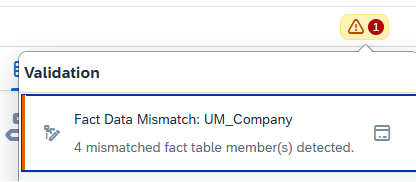
Figure 1: Error message in case of missing master data
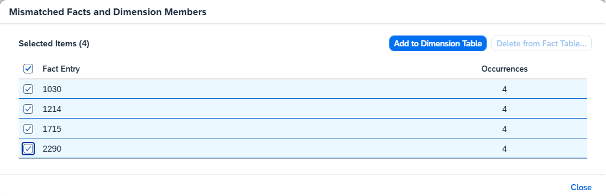
Figure 2:Popup to add missing master data
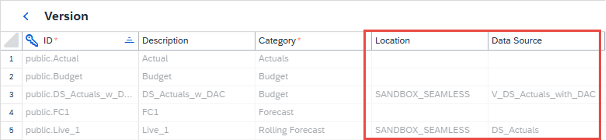
Figure 3:Version with origin in case of live versions
What possibilities does the new functionality offer?
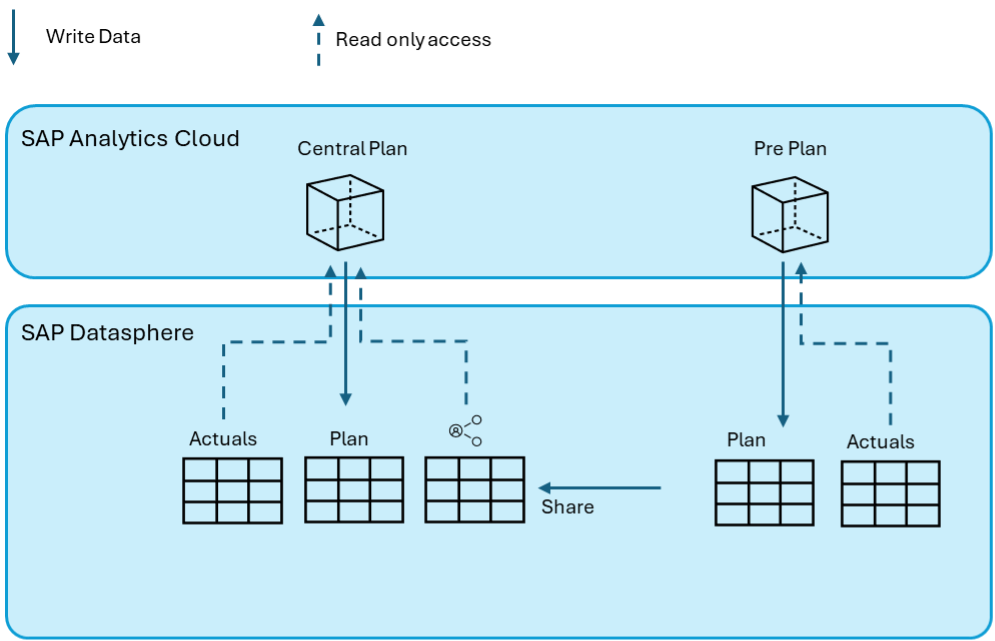
Figure 4: Possibilities with Live Connection in seamless planning
How do SAC and Datasphere permissions interact with Live Connections?
With Seamless Planning, the data is stored in Datasphere, but everything is managed by the SAC.
How does this work with regard to permissions?
- The user needs authorization in SAC to access the planning.
- If the user does not have authorization in the Datasphere (either no user at all or no access to the corresponding space), he can execute the SAC planning but will not see any data that is integrated via the live model. (see Fig. 5)
- If a dimension in the SAC model is marked as authorization-relevant, this restricts the data in the SAC for both the planning data and all live models. (see Fig. 6)
- Please note that the restrictions in SAC do not apply to the data in Datasphere! Users who can access the planning data in Datasphere directly have this access without the SAC restrictions! Separate restrictions (DAC) must also be implemented in Datasphere for this purpose and kept in synch!
- If there are restrictions in Datasphere via “data access control” for the user, these also apply if the data is integrated into a planning model via a Live Connection. (see Fig. 6)

Figure 5: SAC users without Datasphere user or space authorization: Planning is possible, but live data is missing!
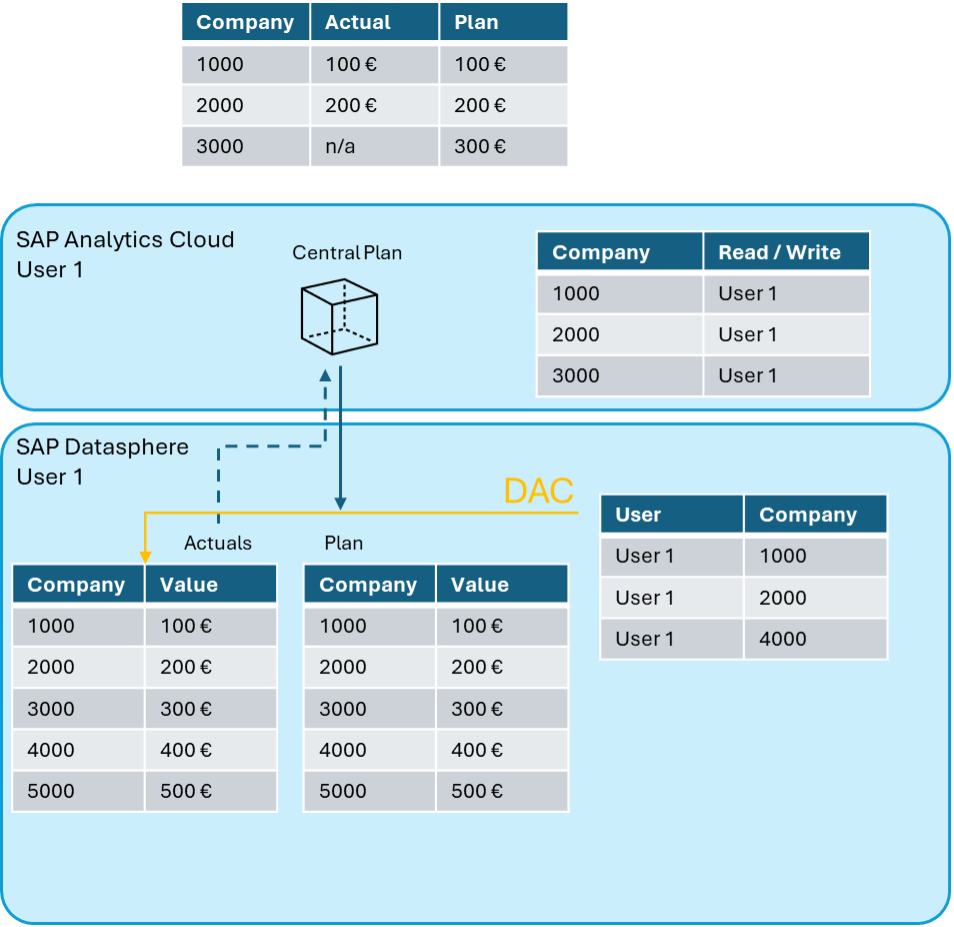
Figure 6: DAC - Authorization in Datasphere and restriction in SAC
-> both apply to live data; plan data only uses the SAC restriction.
Is a Self-Reference to the plan data possible?
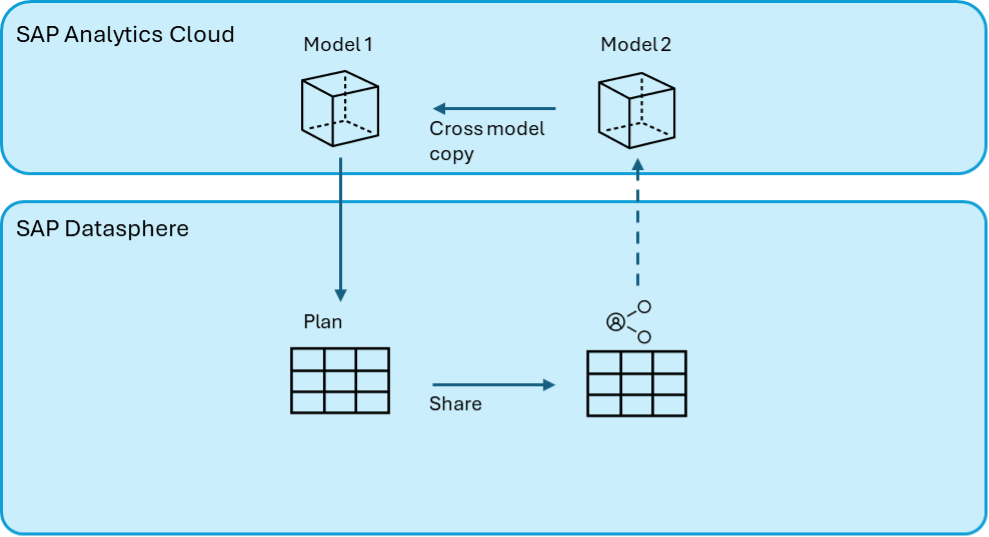
Figure 7: Self-referencing virtual data model possible via second SAC model