
January 2026
Introduction
Solution Approach
Authorization maintenance in BW and mapping BW users to SAC User
In our example, we assume that authorizations for company codes are maintained individually. We have solved this using a planning-ready aDSO with the key fields “BW User” and “Company” as well as the planning-relevant attribute “Flag Valid.” We use the flag to revoke authorizations, as it is not that easy to delete rows.
To enable mapping to a different BW username, we simply added the attribute “SAC User” to the characteristic “BW User.” This must then be maintained once for each user.

Figure 1: Example of user authorization maintenance
If authorization is required for hierarchy nodes or time-dependent maintenance, the scenario must be expanded accordingly, but this does not change the basic logic.
Derive BW - Authorizations from the Table
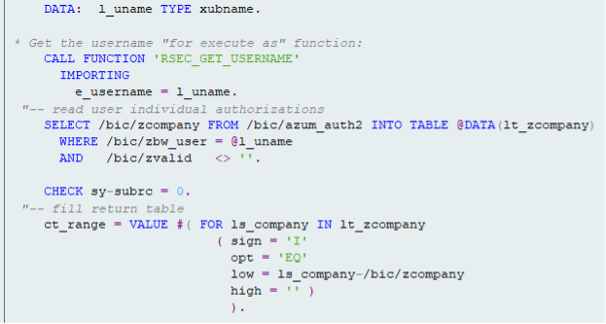
Figure 2: Coding of the exit variable for BW authorization
Now all that remains is to create a BW authorization object and assign the authorization to the corresponding characteristic for the desired info providers using the exit variable. (see next picture)
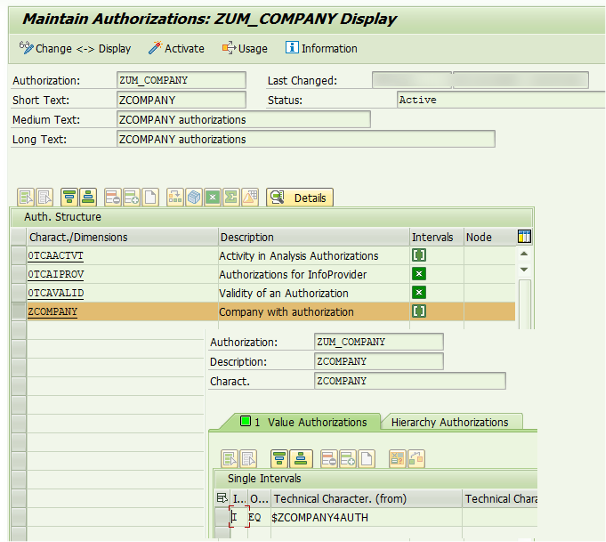
Figure 3: BW Authorization object for restriction using the authorization variable ZCOMPANY4AUTH
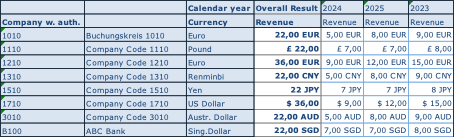
Figure 4: Example BW - Report without restriction
And one to whom the authorization applies:

Figure 5: Same reportfor user with restriction
Synchronization with the SAP Analytics Cloud
In SAC, the company code is created as a public dimension in accordance with BW:
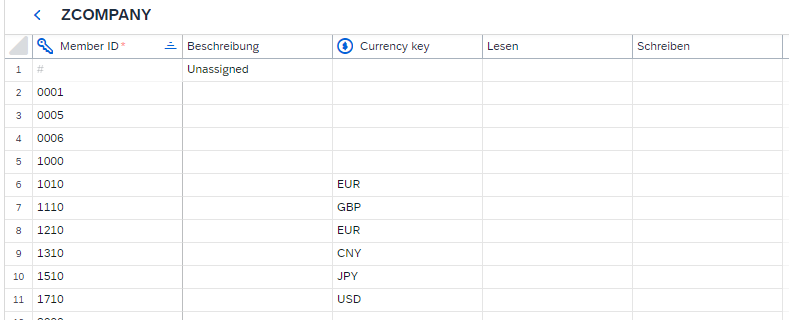
Figure 6: Public authorization relevant SAC dimension
In addition, data access authorization is assigned. For the following example, we will consider only write authorization, but the same approach also applies to read authorization or a combination of both.
To provide the authorization information in the SAC, we need a query that displays all permitted accesses. The authorization-relevant attribute (in this case, ZCOMPANY) and all users (the SAC username is important at the end) who have access to it must be listed.
In our example, this appears as follows in SAC:
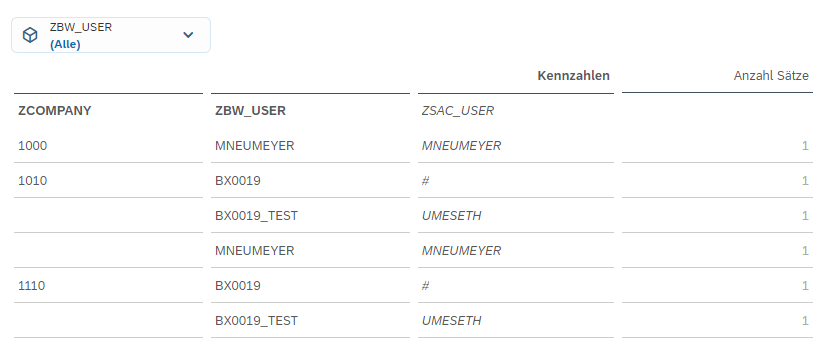
Figure 7: BW report in SAC with all maintained authorizations
This outline is necessary because the assignment of company code and user with the attribute SAC User is read via the result set in the script in order to transfer the authorizations to the SAC dimension.
The actual synchronization takes place in the script. This is triggered by a simple button. This calls up the method “f_setAuthoriation” wich is defined as follows:

Figure 8: Definition of function to transfer the authorizations
Within this method, several variables are first defined
// Get result set from table data source
var tableResultSet = p_Table.getDataSource().getResultSet();
// Reference planning model
var planningModel = PlanningModel_1;
// Get all members of the given dimension
var planningModelMembers = planningModel.getMembers(p_Dimension);
// Array for members to be updated
var members = ArrayUtils.create(Type.PlanningModelMember);
// Array to store BW member–user combinations (DIM$USER)
var dimensionMembersBW = ArrayUtils.create(Type.string);
// Temporary variables
var dimensionMember = "";
var dimensionUser = „“;
var dimensionKey = „“;
// Array to store unique dimension members from BW
var dimensionArrayBW = ArrayUtils.create(Type.string);
After that, two loops are executed. The first loop iterates through the result set and creates an artificial key combining the company code and the user. In addition, an array is populated with the individual company codes.
// Extract dimension members and users from BW result set
for (var j = 0; j < tableResultSet.length; j++) {
// Get dimension member ID
dimensionMember = tableResultSet[j][p_Dimension].id;
// Get BW user mapped to SAC user
dimensionUser = tableResultSet[j][p_User].properties["ZBW_USER.ZSAC_USER.DISPLAY_KEY"];
// Build DIM$USER key if user exists
if (dimensionUser !== „#“) {
dimensionKey = dimensionMember + "$" + dimensionUser;
dimensionMembersBW.push(dimensionKey);
}
// Store unique dimension members
if (dimensionArrayBW.includes(dimensionMember) === false) {
dimensionArrayBW.push(dimensionMember);
}
}
In “dimensionKey,” we have the combined keys from BW that should have write permission.
The second loop runs through the planning model elements of the company code in the SAC. Here, it must be checked whether the company code from BW corresponds to that from the SAC. In addition, existing teams should not be changed. In this variant, all users are removed and replaced with those from BW, while all teams remain unchanged.
// Loop through planning model members
for (var n = 0; n < planningModelMembers.length; n++) {
// Process only members found in BW result set
if (dimensionArrayBW.includes(planningModelMembers[n].id) === true) {
// Remove existing user writers but keep team writers
for (var i = 0; i <= planningModelMembers[n].writers.length; i++) {
var member = planningModelMembers[n].writers.pop();
if (member !== undefined && member.type === UserType.Team) {
planningModelMembers[n].writers.push(member);
}
}
// Add users as writers based on BW mapping
for (var k = 0; k < dimensionMembersBW.length; k++) {
if (planningModelMembers[n].id === dimensionMembersBW[k].split(„$“)[0]) {
planningModelMembers[n].writers.push({
id: dimensionMembersBW[k].split(„$“)[1],
type: UserType.User
});
}
}
// Collect updated member
members.push(planningModelMembers[n]);
}
}
The customized company codes are listed under “members.” To adjust the authorizations, all you need to do is update the planning model.
// Update dimension members with new authorizations
planningModel.updateMembers(p_Dimension, members);
After the function was run, the company code looks as follows:
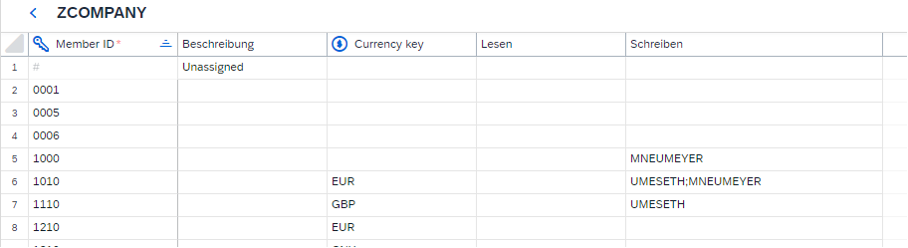
Figure 9: SAC dimension after take over of BW authorizations
Both users are authorized for the company codes that correspond to the values returned by the query.
This makes it possible to synchronize authorizations across both systems; however, there are a few pitfalls. If the BW user do not correspond one-to-one with the SAC username, the SAC username must be added as an attribute and maintained accordingly. If this attribute is maintained incorrectly in BW, the user will still be included in the authorization. This results in an error in the dimension itself, with the following error message:

Figure 10: Error message if an SAC user is transferred which does not exist in SAC
SAC suggests removing the incorrect users. The correct users must then be manually maintained.
The script must always be executed when changes to permissions need to be transferred. In the version presented, it is up to the user to decide when the changes should be made.
Runtime
Since this function is located in a script behind a button, the SAC page must not be closed during synchronization until the script has been executed!
The runtime depends on the number of values for the authorization-relevant attribute. If there are more than 1000 entries, which can occur, for example, with an authorization for a cost center, runtimes of several minutes must be expected, which increase linearly with the number of entries.
Since the result set in the script takes the current selection, the amount of data can be adjusted with a filter. This allows the administrator to perform a comparison specifically for the combinations that have just been changed, with correspondingly short runtimes.
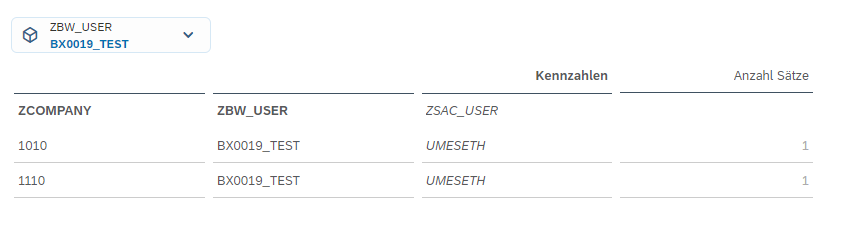
Figure 11: Example of user list with restriction to a single User
Conclusion
The effort involved in authorization synchronization is relatively low. With little coding, the authorization information can be transferred from BW to SAC. If users have the same ID in both systems, the attribute on the BW object is not even required. However, there is currently no good way to check whether the transferred users and company codes also exist in SAC. If a company code exists in BW but not in SAC, the corresponding authorization would not be taken into account. It must therefore be ensured that the master data of the authorization-relevant attribute is identical to that in BW, i.e., it is best to load it from BW and ensure that the users also exist in SAC.