
January 2026
Planning with Power BI
Introduction
With Translytical Task Flow Power BI provides a powerful new feature that allows targeted end-user interactions to be integrated directly into reports. This allows classic, purely analytical reports to be expanded into interactive applications in which user input is actively incorporated into processing logic.
In combination with Microsoft Fabric User Data Functions , it is now possible for the first time to write values from Power BI reports back to Fabric databases in a controlled manner. This write-back scenario is a long-awaited feature for many customers and thus lays the foundation for planning functionality, which is why the feature has become a direct focus for us. The Fabric User Data Functions act as a server-side, user-defined logic layer within Microsoft Fabric and can be quickly implemented using Python functions. They enable the validation, transformation, and persistent storage of user input while providing a clean separation between the front end (Power BI) and back end (Fabric). Thanks to native integration into the Fabric ecosystem, existing artifacts such as lakehouses, warehouses, or other data stores can be used directly, and a package from Microsoft provides developers with tools that, for example, return error states and validation problems to the client in a standards-compliant manner via HTTP response codes.
Detailed information to the concepts, possible applications, and current limitations of the feature can be found in the official Microsoft documentation:
https://learn.microsoft.com/en-us/power-bi/create-reports/translytical-task-flow-overview
In our previous blog post,
Databricks and Planning or Simple Inputs
we described the requirements that a tool must meet to map simple or complex planning scenarios. In this blog post, we will examine which of these are possible with the new features in Power BI and where the limitations lie.
User Entry using the Power BI–Tool
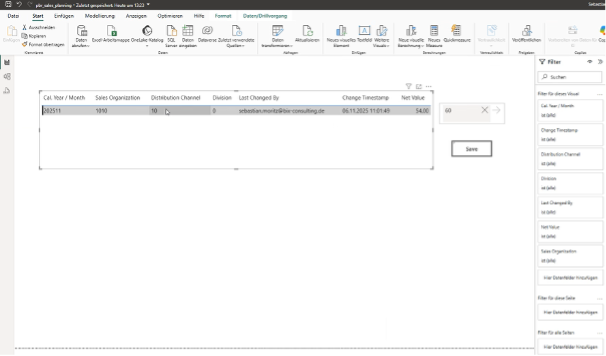
Figure 1: Power BI Layout with an input ready field to write back data
Data input using Excel
Although Power BI is becoming increasingly popular, planning via Excel as an interface remains very popular. In addition to integration with Power BI, User Data Functions also provide a Rest API interface that we can use for data transfer from Excel. To do this, authentication must first be implemented. Unlike other programming languages such as Python, VBA does not have a standard library from Microsoft that handles authentication with Microsoft Entra ID, which is why authentication must be implemented in VBA itself at this point.
Next, a user data function implemented in Fabric is required to receive the values from Excel, process them, and then write or update them in a table. At this point, the database in Microsoft Fabric offers the preferred data storage because Fabric warehouses are not currently optimized for selective write access and updates. Currently, an unnecessary number of file operations are still being created in the background, which significantly affects performance.
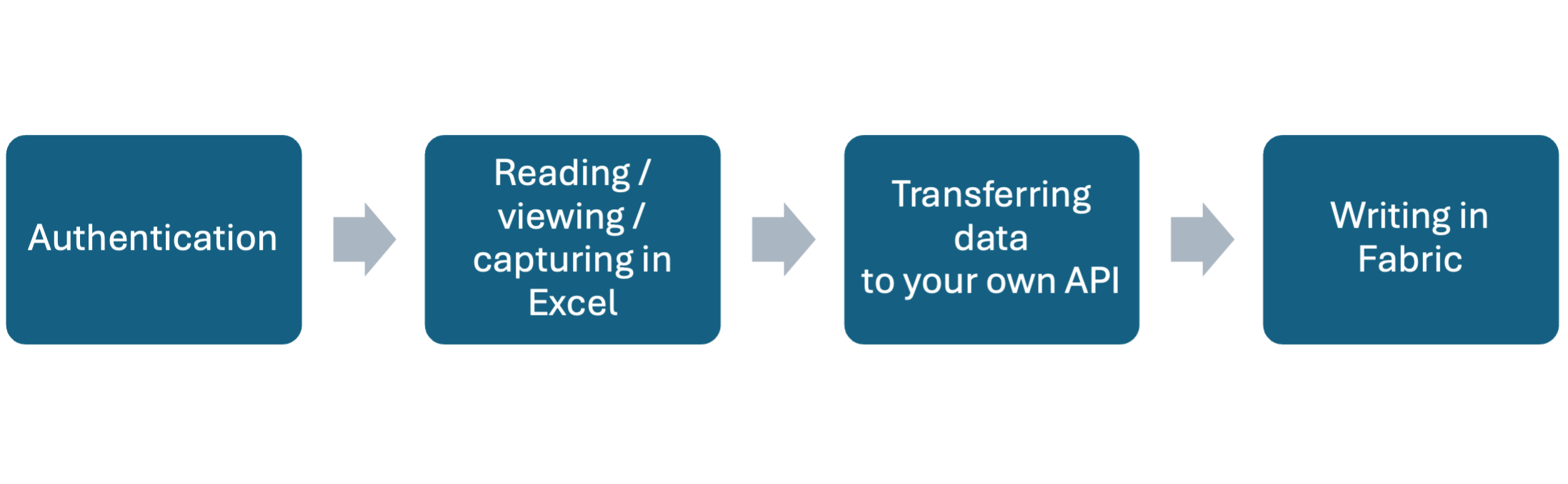
Figure 1: Actions for data entry via Excel
In addition to the write functionality, other necessary checks or functionalities can be implemented in the user data function. For example, it would be possible to ensure that figures can only be written back within certain time periods or checked against a central planning lock.
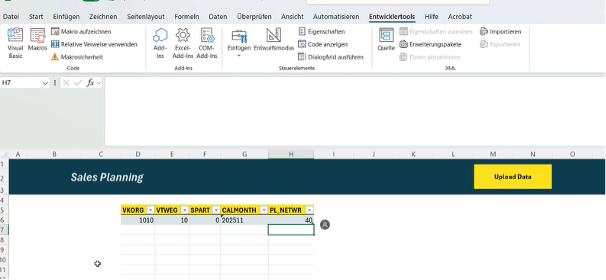
Figure 1: Possible layout for data entry via Excel and API
Unlike Power BI, this solution allows entire tables to be written back, making it ideal for situations where the figures are already being prepared in an Excel workbook. All functions required during data entry, such as displaying locked months and performing calculations during data entry, must be implemented in Excel. Functions that can only be performed during saving can be stored in the User Data Function. In general, it is preferable to implement most of the logic centrally in the user data function so that the code in the client application cannot be manipulated and changes can be managed centrally. It is also possible to implement fundamental planning functions such as splash down in the API, thereby significantly expanding the range of functions offered by the solution. The possibilities are vast, but always involve development effort, while the standard functions remain limited.