Bundle corporate data with AI-model output

August 2025

Introduction
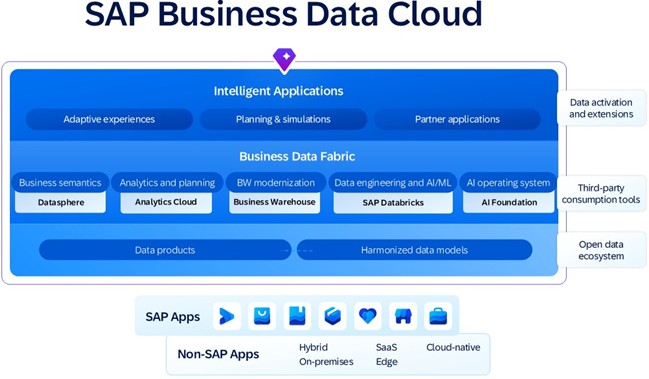
Introduction of the new SAP flagship Business Data Cloud reveals how SAP’s corporate data and business AI will be co-working in the upcoming future. 

Databricks takes crucial place in the SAP brand-new platform’s architecture, whereas Datasphere takes up modeling tasks and SAP Analytics Cloud is responsible for data visualization . 

Quelle: https://www.sap.com/products/data-cloud.html 

In this blog I would like to demonstrate how the conjunction of the three products allows us to bundle SAP data with a custom machine learning model output and visualize the results. 

I am going to demonstrate an Ice Cream Demand Forecast scenario, in which actual transactional sales data is combined with a weather forecast made with a custom Predictive model. 

The current blog is not intended to showcase a complex machine learning case or a Datasphere modeling best practice, rather than to demonstrate how interaction between the products looks like and how they complement each other. Hereby described business case is simplified, though the same concept can be used in cases of any complexity like customer behavior analysis, personalized chatbots creation, inventory management optimization, social media campaign analysis and many more. 

In this blog I am going to describe how to:: 

  • build a Predictive Linear Regression model in Databricks for weather prediction; 
  • share predicted results with Datasphere; 
  • build an Analytical Model in Datasphere, combining transactional data and predicted forecast received from Databricks; 
  • consume the Analytical Model in SAC and build a Demand Forecast Story. 

Before we dive in, please note that I’m not using a BDC tenant. Datasphere and SAC will only be available within BDC starting from 1st Jan 2026, hence why my initial idea was to utilize the BDC-Trial. But unfortunately, my Trial tenant was limited enough to prevent me from creating custom Data Products and share them with Databricks. Creating custom notebooks in Databricks neither was possible.  

My Datasphere and Databricks tenants reside in separate clouds and connected via JDBC. BDC in its turn uses Delta Share-Protokoll to exchange data between applications. 

Nevertheless, we should keep in mind that Data Products are essentially datasets, and the only difference between this blog and BDC tenant is the data exchange protocol. 

Contents

Business Scenario

Technical implementation 

  • Data model overview 
  • Building a linear regression model in Databricks 
  • Modelling in Datasphere 
  • SAC visualization

Summary

Business Scenario

An ice cream manufacturer produces two types of ice cream: milk-based and fruit-based. Each summer season a Demand forecast is created based on the previous year’s actuals. And each season actuals may significantly vary from the previous year’s numbers in month-to-month comparison. 

The company conducted an analysis that pointed out…surprise-surprise… weather as the main factor affecting the demand. 

A correlation was found between the air temperature and sold quantity of each ice cream type: as temperature grows up, the quantity of sold fruit-based ice cream grows up, and as temperature goes down, the quantity of sold milk-based ice cream increases. 

Having this correlation found, a Machine learning model is built to produce weather forecast for the following month. Knowledge of the air temperatures allows to make Demand forecast more accurately. Precise Demand forecast, in its turn, leads to increased liquidity, improved procurement and reduced warehousing costs. 

Technical implementation

Data model overview

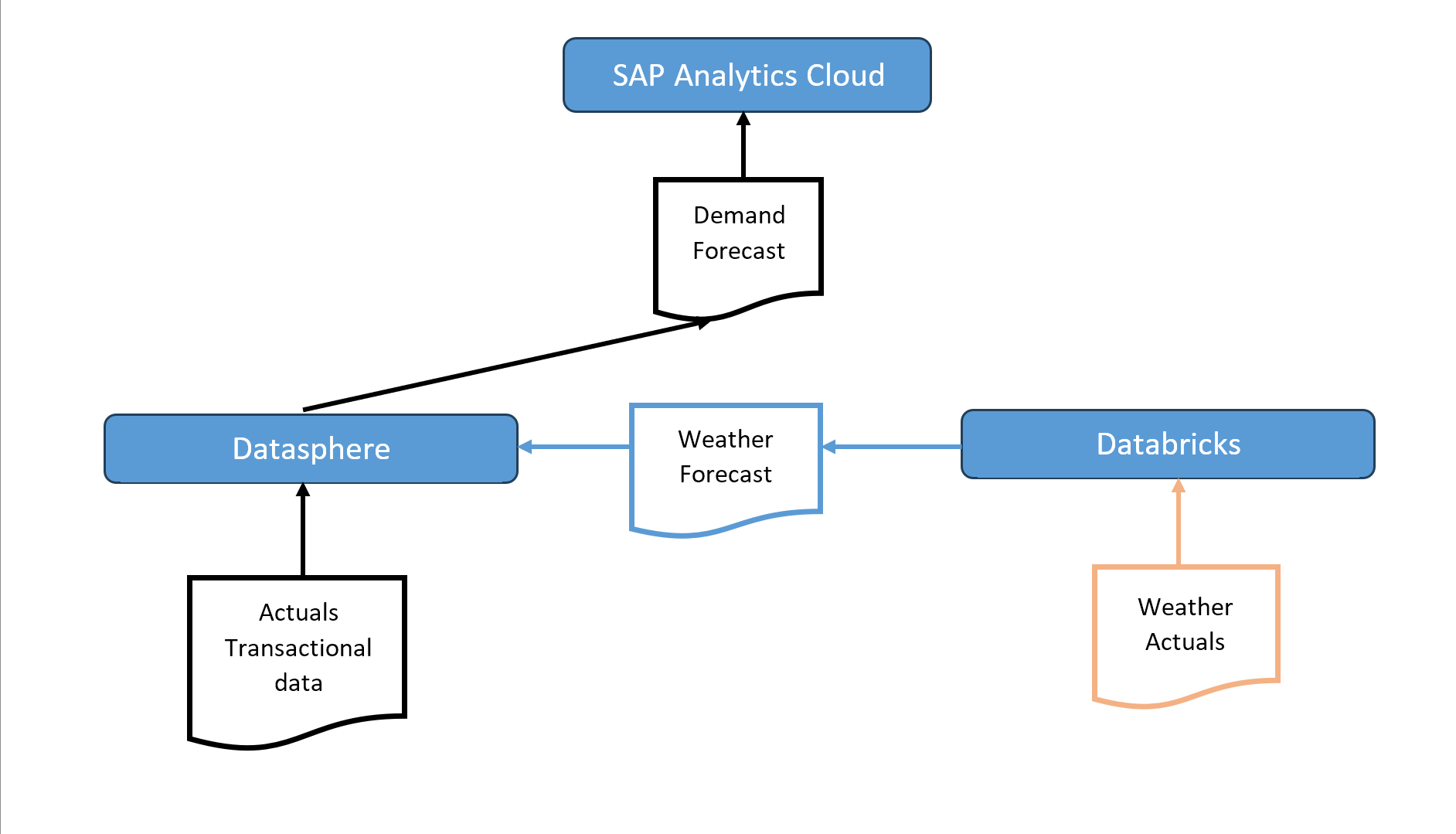
Actuals are loaded in Datasphere via a .csv file, which will be a data product in BDC tenant, coming from a transactional system, e.g S/4HANA cloud.

Weather actuals dataset comes from Zenodo.org directly into Databricks (in a real-life scenario it can be any other weather service).

Databricks receives weather actuals as a training dataset for the ML-model. After the model is trained, it produces a weather forecast for the next month. Then the forecast is sent to Datasphere for further modeling and calculations.

Datasphere receives weather forecast from Databricks and calculates Demand Forecast based on previous year’s sales actuals.

Created in Datasphere Analytic model then becomes a data source for an SAP Analytics Cloud story.


Complete Data flow is shown below:
Building a linear regression model in Databricks

Below you can find a python script that I use to create a Linear Regression model for weather predictions.


Install required libraries:

Load the dataset into a Pandas Data Frame. Out of all regions I only use Basel.

Dataset is taken from: https://zenodo.org/records/4770937/files/weather_prediction_dataset.csv

Perform one-hot encoding and define feature vector and target variable

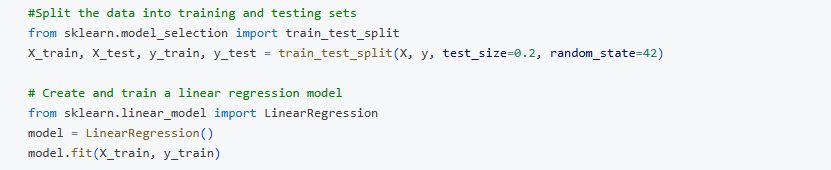
Define training and testing sets and train the model
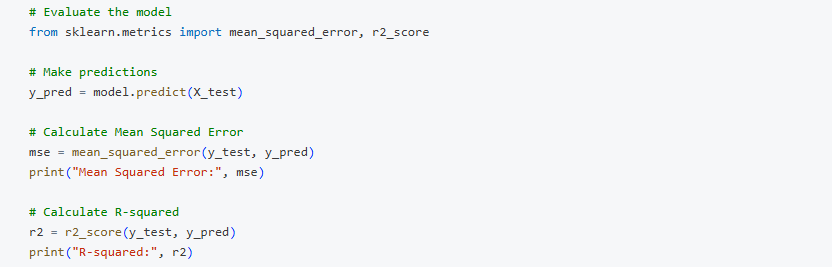
Evaluate the model with MSE and R-squared
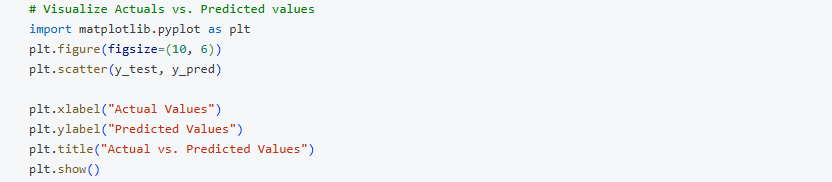
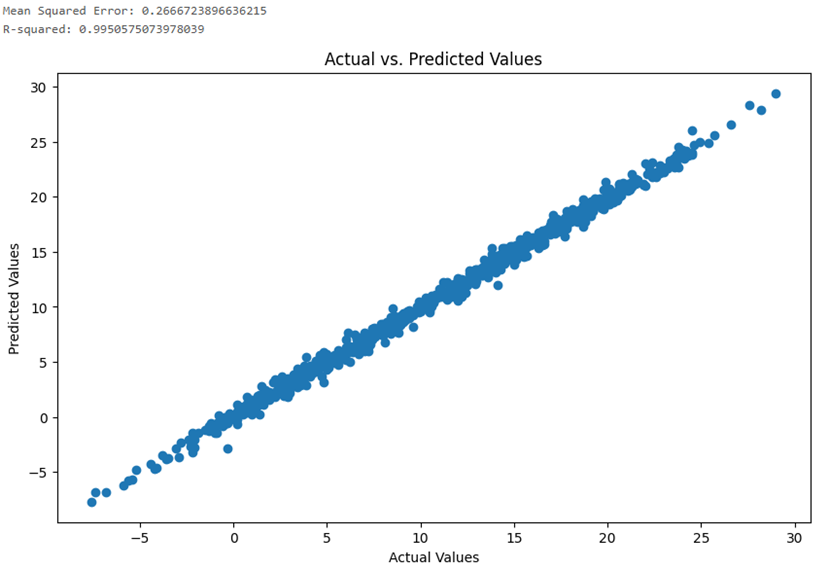
Visualize model accuracy
Now the pretrained model is ready to predict August 2025 temperatures.

"X_test_aug_2025" contains a feature vector;

"y_pred_2025" – predicted temperatures;

"August_2025_output" data frame contains output dataset with the number of days in each temperature category.

Defined categories:

"Cold" – lower than 17 degrees;

"Warm" – between 17 and 19 degrees;

"Hot" – higher than 20 degrees.
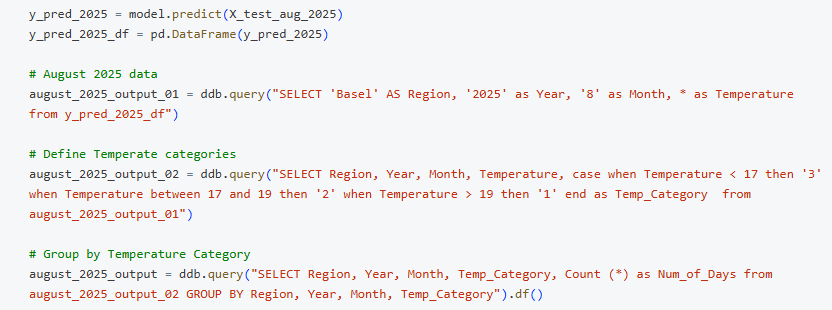
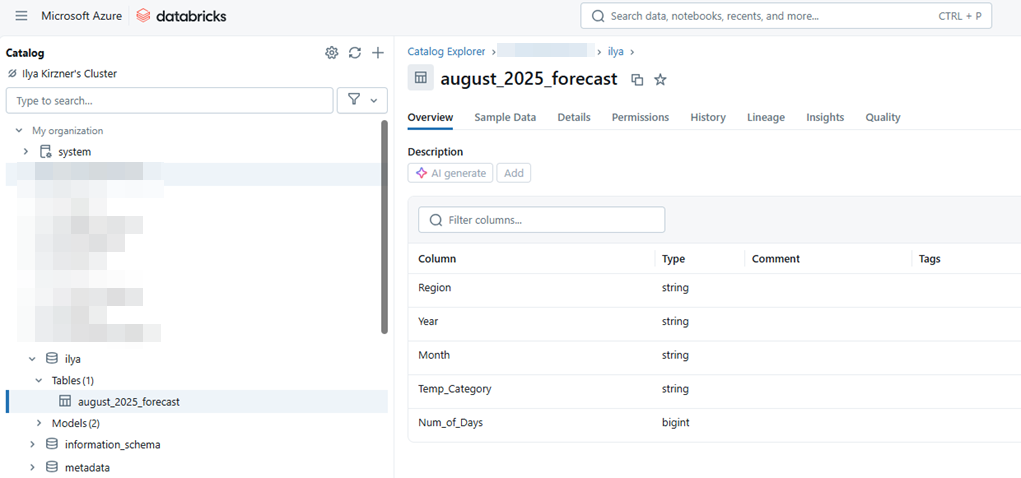
Convert Pandas data frame into Spark data frame and save the table in the Unity Catalog. The final table "August_2025_Forecast" contains Region, Year, Month, Temperature Category and expected Number of Days per each temperature category.

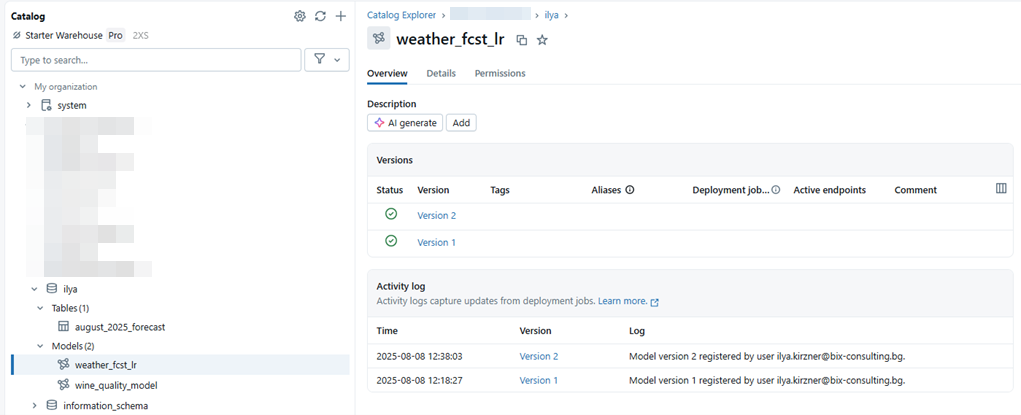
Log and register the model to be able to use it in the future.

The model "weather_fcst_lr" is saved in the Unity Catalog.
Modelling in Datasphere

As the next step I’d like to pull the weather forecast from Databricks into Datasphere and bundle it with the transactional data.


Datasphere model is shown below:
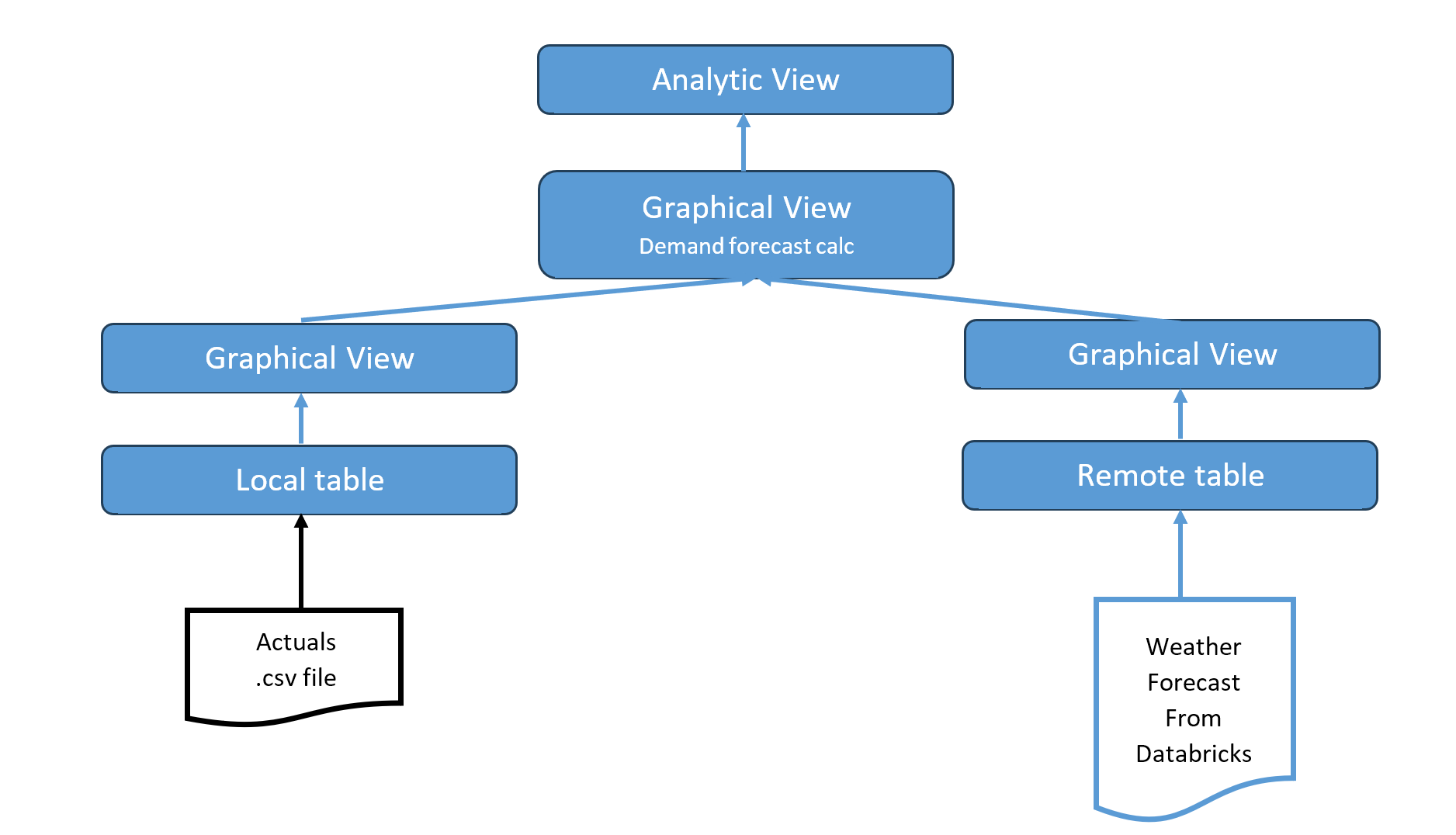
Weather forecast generated in Databricks is pulled via a remote table in Datasphere using Generic JDBC connection:

Check out this Blog showing steps to establish JDBC connection between Datasphere and Databricks.
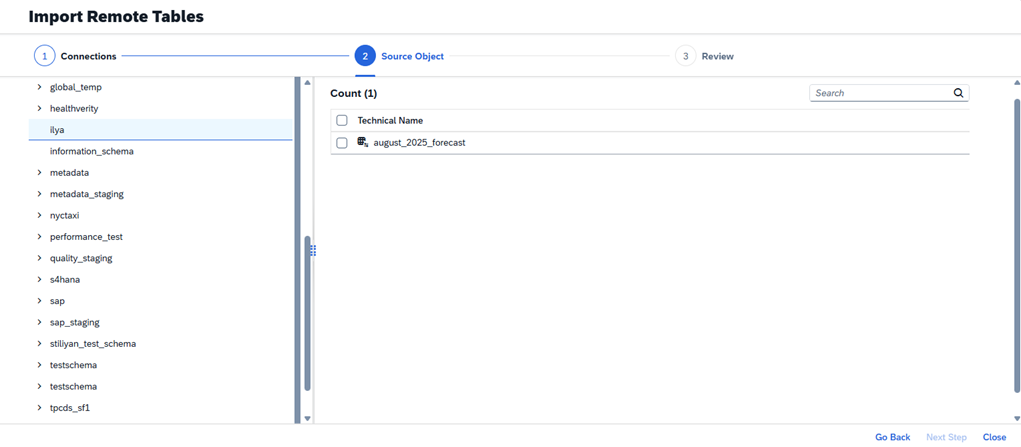
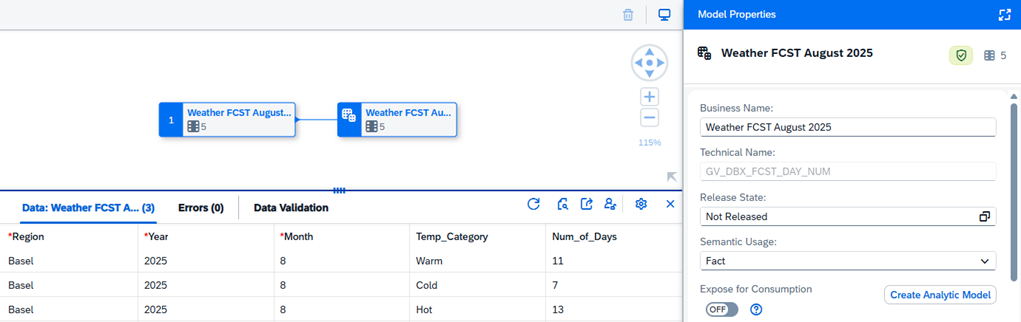
A Graphical View "GV_DBX_FCST_DAY_NUM" is built on top of the remote table:
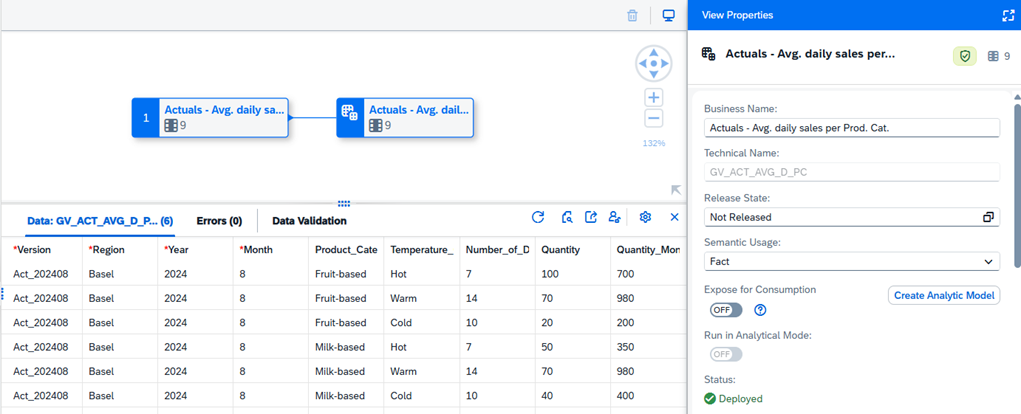
Graphical View "GV_ACT_AVG_D_PC" is built on a local table which contains previous year average daily sales quantity per product category respectively to each Temperature category. You can see the data preview below:
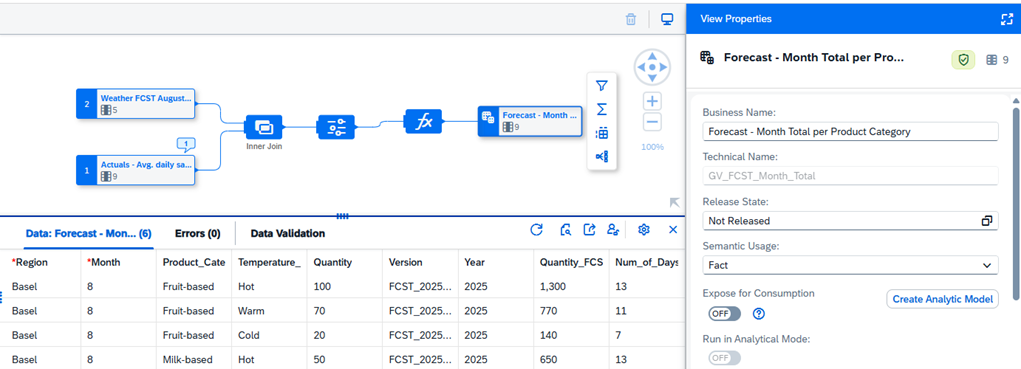
Graphical view "GV_FCST_QUANT" contains the next month Demand forecast ("Quantity_FCST") calculation.

August 2024 average daily sales quantity is taken for the current year calculation and multiplied with the Number of Days ("Num_of_Days") in respective Temperature category:
 

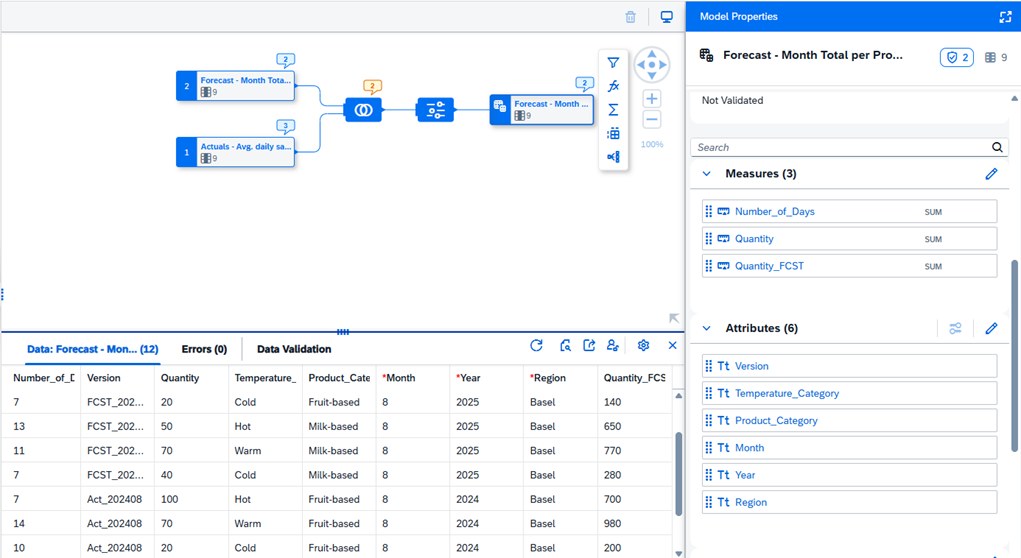
Previous year’s Actuals with the current year’s forecast are combined in the view "GV_FCST_Month_Total".

In the data preview below you can see the "Quantity" column representing daily quantity sold actuals, also taken for the current year forecast calculation. And the "Quantity_FCST" column, calculated as "Quanity" * "Number of days", representing the current year monthly quantity forecast. It is important to mark measures in the view output.
 

Analytic Model "AV_ACT_FCST_QUANT" is created on top of the graphical view "GV_FCST_Month_Total" for further consumption in SAC:

 

SAC Visualization

Analytic model "AM_ACT_FCST_QUANT" is used in the SAC story directly as a data source. The model is available via the SAC-Datasphere connection:
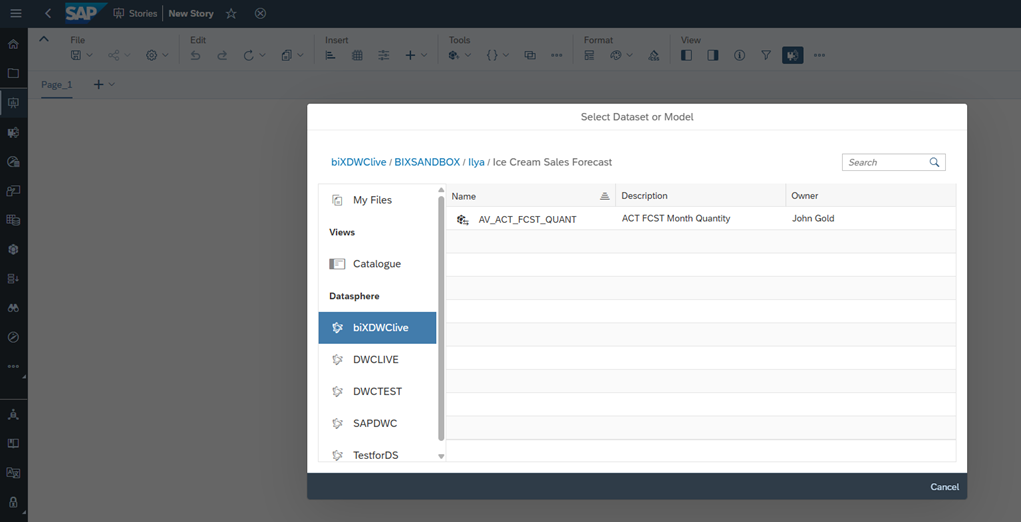
 

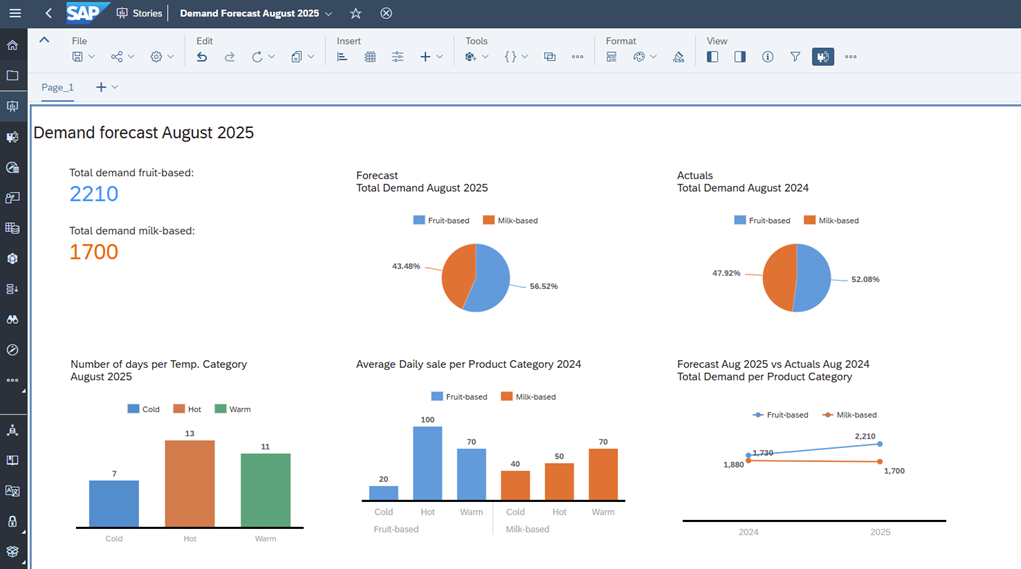
The Story below contains visualizations built upon the Analytic model:

  • total demands per product category
  • number of days per each temperature category
  • previous year’s average daily sale per product category
  • forecast vs actuals comparison


Summary

In this blog I have shown how SAP Datasphere, SAP Analytics Cloud and Databricks can work together and allow to bundle corporate data with an AI-model output. Even though the use case is simplified, the same concept can be used in cases of any complexity like customer behavior analysis, personalized chatbots creation, inventory management optimization, social media campaign analysis and many more.

I have demonstrated how to:

  • build a Predictive Linear Regression model in Databricks for weather prediction
  • share predicted results with Datasphere
  • build an Analytical Model in Datasphere, combining transactional data and predicted forecast received from Databricks
  • consume the Analytical Model in SAC and build a Demand Forecast Story


Stay tuned for more articles on Business Data Cloud, Databricks and business AI on how these applications are changing the way we interact with corporate data!


If you are interested in further discovering SAP Business Data Cloud, you might like to watch the webinar on the topic, prepared by the biX Consulting team: https://www.bix-consulting.com/en/sap-business-data-cloud/


 

Data Products Setup

I’ll start with Data Products setup. If you’re new to the concept, this recent video is a great starting point, but here’s a short summary. A data product is a well-described, easily discoverable, and consumable collection of data sets.

Creating a Data Product in Datasphere

Note that in this article I create Data Products in the Data Sharing Cockpit in Datasphere. This functionality is expected to move into the Data Product Studio, but that had not taken place at the time writing.

Before creating a Data Product in Datasphere, I need to set up a Data Provider profile, collecting descriptive metadata like contact and address details, industry, regional coverage, and importantly define Data Product Visibility. Enabling Formations allows me to share the Data Product with systems across your BDC Formation – Databricks, in this case.

With the Data Provider set up, I can go ahead and create a Data Product. As with the Data Provider, I’ll need to add metadata about the product and define its artifacts – the datasets it contains. Only datasets from a space of SAP HANA Data Lake Files type can be selected. Since this Data Product is visible across the Formation, it is available free of charge.

For this demo, the artifact is a local table containing ten years of Ice Cream sales data. Since this is a File type space, importing a CSV file directly to create a local table isn’t an option (see documentation).

I used a Replication Flow to perform an initial load from a BW aDSO table into a local table.

Once Data Product is created and listed, it becomes available in the Catalog & Marketplace, from where it can be shared with Databricks by selecting the appropriate connection details.

Jump into Databricks

To use the shared object In Databricks, I need to mount it to the Catalog – either by creating a new Catalog or using an existing one.

Databricks appends a version number to the end of the schema – ‘:v1’ – to maintain versioning in case of any future changes to the Data Product.

Once the share is mounted, the schema is created automatically, and the Sales actual data table becomes available within it. From there, I can access the shared table directly in a Notebook.

Creating a Data Product in Databricks

To create a Data Product in Databricks, I first need to create a Share – which I can either do via the Delta Sharing settings in the Catalog:

Or directly out of the table which is going to become a part of the Share:

Since a single Share can contain multiple tables, I have the option to either add the table to an existing Share, or create a new one:

To publish the Share as a Data Product, I run a Python script where I define the target table for the forecast and describe the Share in CSN notation, setting the Primary Keys. Primary Keys are required for installing Data Products in Datasphere.

Jump back into Datasphere

Once the Databricks Data Product is available in Datasphere, I install it into a Space configured as a HANA Database space – since my intention is to build a view on top of the table and use it for planning in SAC.

There are two installation options: as a Remote table for live data access, or as a Replication Flow, in which case the data is physically copied into the object store in Datasphere.

Since I want live access, I install it as a Remote Table:

and build a Graphical view of type Fact on top:

Forecast calculation

With my Data Products set up and Sales actual data are available in Databricks, I create a Notebook to calculate the Sales Forecast.

The approach combines Sales and Weather data to train a Linear Regression model. I import the Weather data *https://zenodo.org/records/4770937 from an external server directly into Databricks, select the relevant features from the weather dataset, and combine them with the Sales actual data:

* Klein Tank, A.M.G. and Coauthors, 2002. Daily dataset of 20th-century surface
air temperature and precipitation series for the European Climate Assessment.
Int. J. of Climatol., 22, 1441-1453.
Data and metadata available at http://www.ecad.eu

Using the “sklearn” library, I build and train a Linear regression model:

Once trained, the model predicts the Sales forecast for Rome in June 2026 based on the weather forecast, and I save the results to my Catalog table:

Seamless planning data model

Seamless planning concept is built around physically storing planning data and public dimensions directly in Datasphere, keeping them alongside the actual data.

Since the QRC4 2025 SAC release, it has also been possible to use live versions and bring reference data into planning models without replication.

In this scenario, I build a seamless planning model on top of the Graphical view I created over the Remote table. This lets me use the forecast generated in Databricks as a reference for the final SAC Forecast version.


The model setup follows these steps:

Create a new model:

Start with data:

Select Datasphere as the data storage:

From there, I define the model structure and can review the data in the preview.

For a deeper dive into Seamless Planning, I recommend this biX blog.

Process Flow automation

Multi-action triggers Datasphere task chain

The final step is automating the entire forecast generation by using SAC Multi-actions and a Task-Chain in Datasphere – so that my user can trigger the calculation with a single button click from an SAC Story.

The model setup follows these steps:

Create a new model:

Triggering Task Chains from Multi-actions is a recent release. This blog post walks through how to set it up.

For details on how to trigger a Databricks Notebook from Datasphere, I recommend referring to this blog.

With everything in place, I create a Story, add my Seamless planning Model, and attach the Multi-action:

Running the Multi-action triggers the Task Chain, which in turn triggers the Databricks Notebook.

I can monitor the execution details in Datasphere:

and in Databricks:

Once the calculation completes, the updated forecast appears in the Story:

The end-to-end calculation took 2 minutes 45 seconds in total. The Task Chain in Datasphere is triggered almost instantly by the Multi-action, the Databricks Notebook execution itself took 1 minute 29 seconds, with the remaining time spent on Serverless Cluster startup.   


From here, I can copy the calculated forecast into a new private version:

adjust the numbers as needed, and publish it as a new public version to Datasphere:

Conclusion

With SAP Business Data Cloud, it is possible to build a forecasting workflow that feels seamless to the end user — even though it spans multiple systems under the hood.

Companies using BW as the main Data Warehouse and Databricks for ML calculations or Data Science tasks can benefit from using the platform, as the data no longer needs to be physically copied out of BW.

What this scenario demonstrates is that once wrapped as a Data Product, BW sales data can be shared with Databricks via the Delta Share protocol. Databricks, in turn, can then create its own Data Products on top of the calculation results and share them back with Datasphere as a Remote Table.

A Seamless Planning model in SAC sits on top of that Remote Table, giving planners live access to the generated forecast. A single Multi-action in an SAC Story ties it all together, triggering a Datasphere Task Chain that kicks off the Databricks Notebook — completing the full cycle in under three minutes.

As SAP Business Data Cloud continues to mature, scenarios like this one are becoming achievable – leaving the complexity in the architecture and not in the workflow.

Contact

Ilya Kirzner
Consultant
biX Consulting
Privacy overview

This website uses cookies so that we can provide you with the best possible user experience. Cookie information is stored in your browser and performs functions such as recognizing you when you return to our website and helps our team to understand which sections of the website are most interesting and useful to you.