
About this tool
A first introduction to this tool can be found in the following blog post:
BW Modernization continued with the SAP BW Query Template Generator
A first review with hints of installation problems is described here:
And of course, SAP help gives further information:
Query Template Generator for SAP Business Data Cloud
As described in the documentation, this tool will generate all required artifacts in SAP Datasphere. This tool will NOT migrate any data. It is up to you to connect then all the artifacts with the correct new sources in Datasphere. As typical model consists of a lot of dimensions, the list is normally quite long!
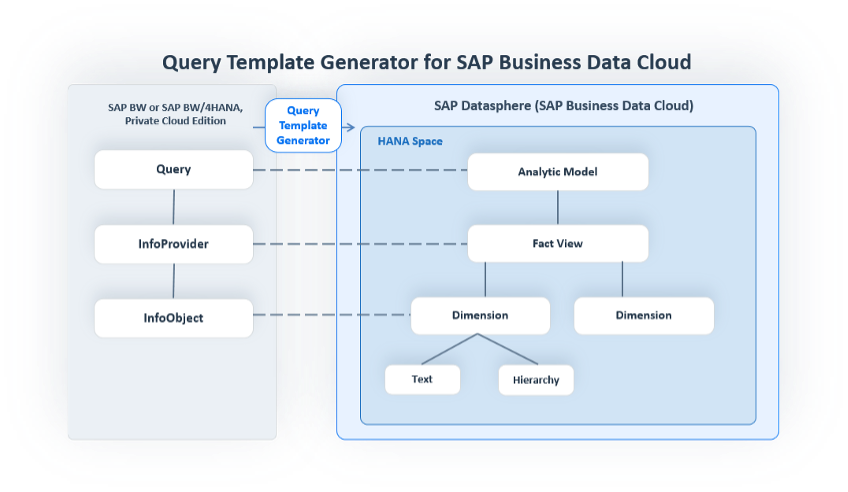
Figure 1: What the query template generator can do (source help.sap.com)
Installation Experience
The installation was quite straightforward. If all required resources are available in your system, you can easily check by starting the transaction RSDWCTG_ADMIN in your BW system. This transaction can be used instead of the eclipse view for administration of the migration. In our system this transaction did not exist, we first had to implement the following notes:
3724724 – Data Subscriptions 4.0 for BW on HANA and BW/4HANA 2021 and 2023
3757146 – DPG & QTG – Correction collection after TCI 4.0 – 1
3774224 – DPG & QTG – Correction collection after TCI 4.0 – 2
After following all steps in the installation guide found in note
3590400 – Configuring the Data Product Generator and Query Template Generator fo
The tool was working.
To be able to use the tool, you need the new authorization S_ADT_RES. With this authorization you can restrict which queries / infoareas a user is allowed to migrate.
Migration of queries
Now you can select a query to migrate as described in the help pages and the blog mentioned above already.
Input is as described straight forward. If the selected query does not contain any unsupported features (see next chapter) you can create the migration request and start migration. The migration takes some time to create all objects, up to 30 minutes for about 150 objects. How to monitor a running migration is described in the next chapter.
In case some objects already exist in datasphere, the behavior of the tool is different, depending if started from SAP GUI or eclipse. The following options are available when starting in SAP GUI, not available when starting from Eclipse.
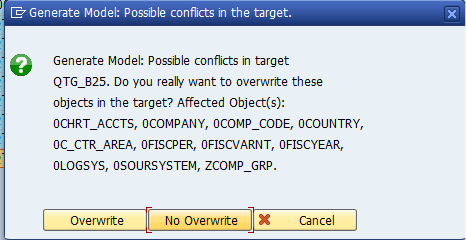
Figure 2: Option to avoid overwriting existing objects when started from SAP GUI
If you run with no overwrite, protocol will tell you that the entry was updated, but objects were untouched in Datasphere, and the migration is faster (see picture below).
In Eclipse you get a detailed warning, which objects already exist and which will be overwritten with the only option to continue:
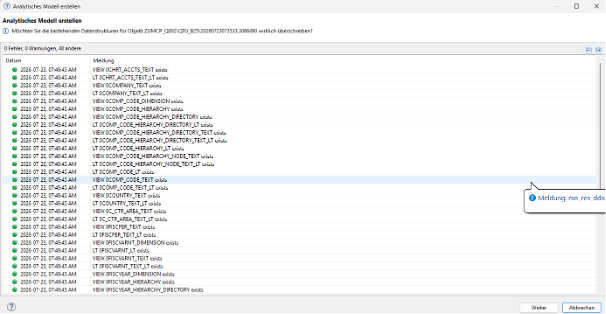
Figure 3: Information of objects to be changed in Eclipse with only option to continue, no selection for "no Overwrite"
When started from Eclipse, changes you already did will be overwritten, there is no way to avoid this (or we did not find the solution!). The only option you than have is to set back manually the objects to the active solution in SAP Datasphere.
- Always use the SAP GUI version if you have already master data changed or you need to revert to deployed version for each artifact!
The tool will give you a detailed list of objects to be created in Datasphere, but unfortunately you are not allowed to change the target name before generation. But object reuse is planned for Q4 according to the roadmap. (see the following roadmap – Entry:Query template generator: reuse of object store entities)
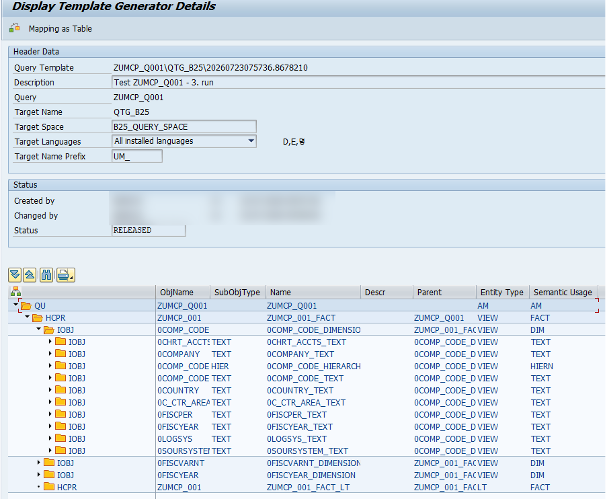
Figure 4: Migration Object list as shown in SAP GUI
Only the analytical model and the fact view will have the prefix! All other objects will have the original name!
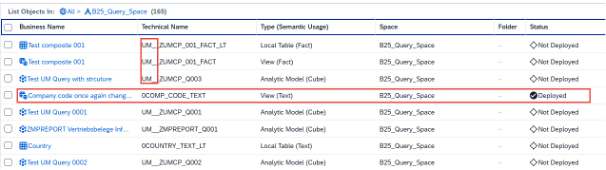
Figure 5: Prefix UM_ added only to Analytical Model and View, not to InfoObjects e.g. 0COM_CODE! Objects to be deployed after migration run. Changed object 0COMP_CODE_TEXT still deployed after run from SAP GUI with option ‘No overwrite’. Starting from Eclipse will revert your changes and set to status “not deployed”.
After starting the migration in the GUI, a detailed list of objects will be given and state that objects are updated even if started with “no overwrite” and objects are untouched!
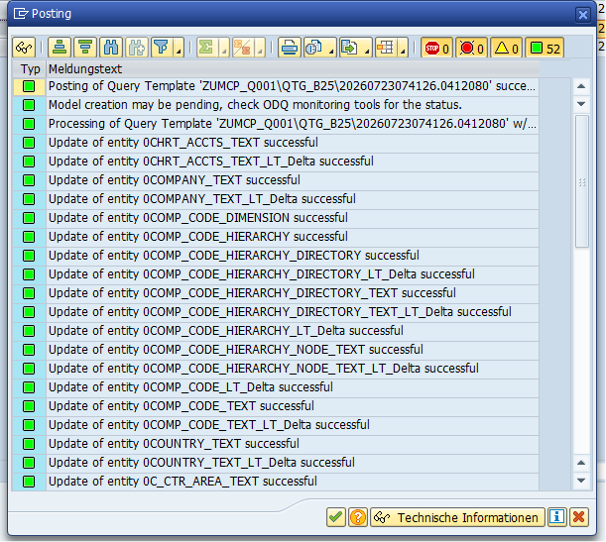
Figure 6: Information in SAP GUI after starting the run with "no overwrite". information will tell you that all entries will be updated, even if this is not the case!
Monitor running migration
To check if object generation is still running, you can use ODQ-Monitor in Transaction ODQ_TQ_MONITOR. For each object an entry is created there. The corresponding ID can be found in the detailed log of the QMT at the end of the list (if started from SAP GUI).
Requests still waiting for execution have the status W, running requests are marked with R, if finished, status is empty.
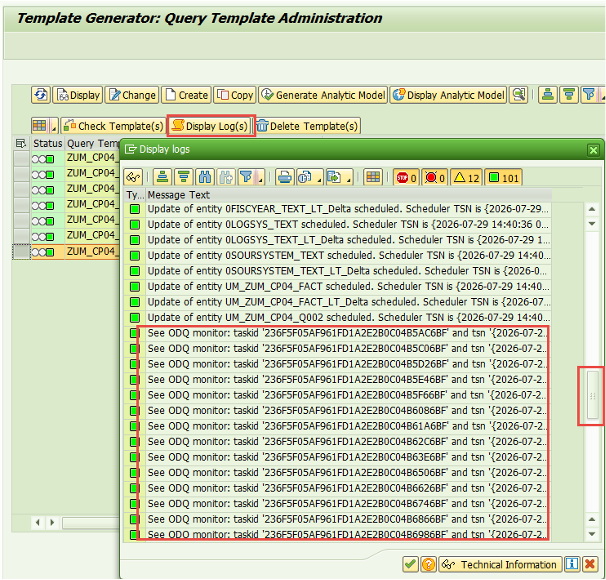
Figure 7: Log with ODQ Monitor ID
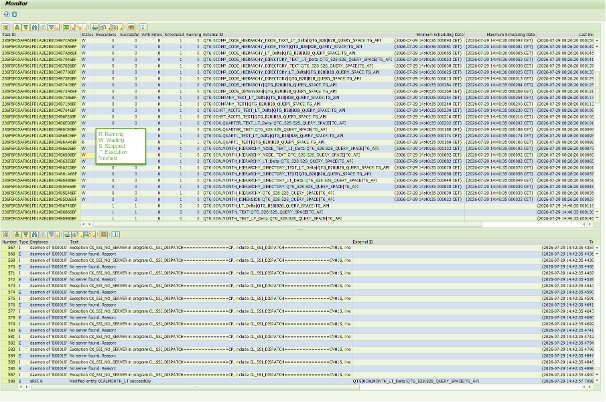
Figure 8: Monitor of running migration steps in Transaction ODQ_TQ_MONITOR (in BW/4, started via GUI)
Limitations of the tool
In case you select a query, which is using functionality not supported for migration, you will have to check the log to find which functionality will not migrated, e.g. the following message for a query of the technical content (0TCT_MC01_Q0424):
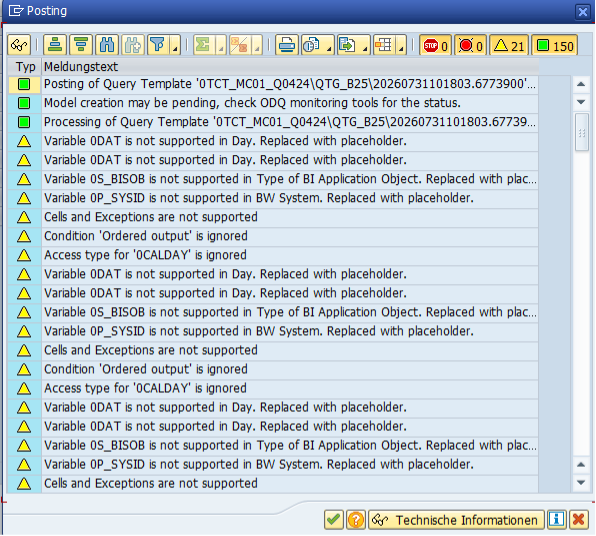
Figure 9: Unsupported functionality in the migration is shown as warning in the migration protocol!
Unfortunately, we have not found a list of the limitations of the tool. What we have found out so far
Attention: This list is certainly not complete and may change with further releases!
- Only queries on top of composite providers or multicubes can be migrated. No queries on aggregation levels or directly on an aDSO is supported.
- As no query on an aggregation level is supported, planning functionality is not supported!
- Cell definition and exceptions will be ignored
And here is our positive list (again for sure not complete!):
- Query with two structures
- Currency conversion
Errors found so far
The analytical model, which represents the query is only created when running the tool in our BW 7.5 system. No analytical model is created running the tool in our BW/4 system. We are still waiting for the answer from SAP to our OSS message for this topic.