
BPC in SAC – Fallstricke bei zusätzlichen Berechtigungen

Einleitung

Seit geraumer Zeit hat SAP ihre Lösung für „Integrierte Planung (IP)“ in BPC (Business Planning and Consolidation) „umbenannt“. Entwickler, die von IP kamen, konnten die zusätzlichen Funktionen, die sich aus der Integration von BPC ergaben (wie BPC-Modelle), gut ignorieren, solange sie im BW blieben und nur die ursprünglichen IP-Funktionen verwendeten.

SAC wird immer beliebter, und mehr und mehr IP-Lösungen werden SAC als Frontend nutzen. Das ist großartig und funktioniert im Prinzip ohne jegliche Einschränkung. Sie müssen „nur“ ein BPC-Modell hinzufügen. Dies ist keine große Sache und schnell implementiert. Aber in einigen Situationen war dies nicht so einfach wie erwartet.

In diesem Blog möchten wir unsere wichtigsten Erkenntnisse mit Ihnen teilen:

  • Erinnerung an die Verwendung von BPC-Modellen und wie man sie am besten testet
  • Probleme bei der Stammdatenplanung
  • Was muss in einem Modell sein -> alle Composites, die in einer Planungssequenz verwendet werden

Bevor wir diese Themen erläutern, wollen wir mit einem kurzen Überblick über die Umstellung von BPC auf SAC beginnen.

Was ist zu tun, um BPC-Lösungen über SAC zu betreiben?

Wenn Sie damit beginnen, SAC als Frontend zu nutzen, ist es großartig, dass Sie die bestehenden BPC-Planungslösungen in Ihrem BW-System weiter nutzen und mit reinen SAC-Planungslösungen kombinieren können.

Dies ist in dieser Blogserie sehr gut beschrieben:

https://community.sap.com/t5/technology-blogs-by-sap/sap-bpc-move-to-sac-benefits-scenarios-of-moving-sap-bpc-planning-scenarios/ba-p/13557405

Die einzige Funktionalität, die wir bisher in SAC nicht gefunden haben, ist das Anlegen neuer Stammdaten über eine eingabebereite Query. Dieser spezielle Fall und mögliche Lösungen sind bereits in unserem Blog beschrieben:

https://www.bix-consulting.com/de/stammdatenpflege-in-bw-bpc-und-sac/

Kleiner Unterschied zwischen der Verwendung von AfO als Schnittstelle und SAC:
BPC-Modell nötig

Die normale Schnittstelle für eingabebereite Queries ist in den meisten Fällen Excel mit dem AfO-Plugin. Sie können aber Planungsqueries in SAC ohne Änderung und Verlust an Funktionalität ausführen (BW-Berechtigungen werden geprüft). Sie müssen „nur“ ein BPC-Modell erstellen, das in Ihrer Planungsverbindung von SAC aus verwendet werden soll. Dies wird im zweiten Blog der oben erwähnten Serie detailliert erklärt:

https://community.sap.com/t5/technology-blogs-by-sap/sap-bpc-move-to-sac-use-sap-analytics-cloud-as-data-entry-ui-for-sap-bpc/ba-p/13554652

Wenn Sie keine berechtigungsrelevanten Attribute in Ihrem Modell haben, sind Sie fertig.

Wenn Sie jedoch berechtigungsrelevante Attribute in Ihrem Modell verwenden, müssen Sie ein Datenzugriffsprofil erstellen, das die Berechtigungen gewährt und die Profile zu den Benutzern hinzufügen. Falls Sie Probleme mit der Berechtigung haben, finden Sie in den folgenden Hinweisen eine Menge Informationen:

1994720 – Checkpoints: Authorization Issue for BPC User, Role, Task, Team and CUA configuration

2646117 – Checkpoints: BPC Embedded Model access via Analysis Office

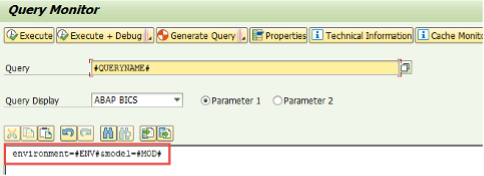
Häufig möchte man nur prüfen, ob eine Abfrage mit einem bestimmten Modell läuft oder ob man ein anderes Modell verwenden muss. Dies kann bereits innerhalb des SAP – GUIs in der Transaktion RSRT überprüft werden, wie im folgenden Hinweis beschrieben:

2824129 – Execute BW Query with BPC Environment and Model setting
Modelle für über SAC gestartete Planungssequenzen

Sie können Planungssequenzen über SAC starten, wie in diesem Blog beschrieben:

https://community.sap.com/t5/technology-blogs-by-sap/sap-bpc-move-to-sac-work-with-bpc-planning-sequences-in-sap-analytics-cloud/ba-p/13558993

Sie können eine Prozesskette auch über eine Funktion in einer Planungssequenz starten, wie hier beschrieben:

https://community.sap.com/t5/technology-blogs-by-sap/trigger-process-chain-from-sac-with-bpc-live-connection/ba-p/13524319

Für die Definition des „BPC-Planungssequenz-Triggers“ müssen Sie ein SAC-Modell und die Planungssequenz angeben:
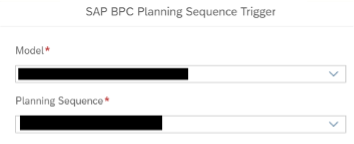
Wenn Sie keine Berechtigungseinschränkungen haben, können Sie jedes beliebige SAC-Modell verwenden. Sobald Sie jedoch Berechtigungen haben, prüft SAP die Berechtigung auf der Grundlage des BPC-Modells, das dem SAC-Modell zugeordnet ist!

Das hat gut funktioniert, aber die folgenden zwei Themen haben uns einige Stunden Zeit gekostet, sie zu lösen.

  • Unsere Planungssequenz lief in RSPLAN ohne Fehler, schlug aber mit einem Berechtigungsproblem fehl, wenn sie über SAC ausgelöst wurde. Das Problem bestand darin, dass die Planungssequenz mehrere Schritte mit Aggregationsstufen auf verschiedenen Composite Provider enthielt! Da Sie der Planungssequenz nur ein SAC-Modell mit einem zugehörigen BPC-Modell hinzufügen können, muss dieses BPC-Modell ALLE in der Planungssequenz verwendeten Composite Provider enthalten, auch wenn sie nicht zur Ausführung der im SAC-Modell definierten ursprünglichen Query erforderlich sind. Leider können Sie dies nur über die SAC-Schnittstelle testen und nicht bereits im SAP-GUI (was in unserem Fall einen Transport bedeutet …)
  • Wenn Sie die SAC-Button bearbeiten, können Sie das Modell und die Planungsreihenfolge ändern und der Button wird die neuen Einstellungen verwenden. Aber wenn Sie das alte SAC-Modell aus der SAC-Story entfernen wollen, ist das nicht möglich. SAC teilt Ihnen mit, dass das Modell noch in einem Button verwendet wird…. Die einzige Möglichkeit, das Modell aus der SAC-Story zu entfernen, besteht darin, die Schaltfläche zu löschen und eine neue Schaltfläche zu erstellen.

Stammdatenplanung in SAC und Berechtigungen in Modellen

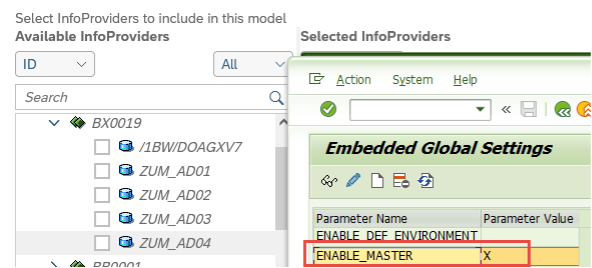
Schließlich ist es nun möglich, Stammdatenattribute über eine Planungs – Query zu pflegen (sog. Stammdatenplanung). Falls Sie die Stammdatenplanung auch in BPC nutzen wollen, müssen Sie dies im Customizing aktivieren:

Transaktion SRPO -> BPC -> Nur eingebettet -> Globale Einstellung -> Stammdaten aktivieren

Jetzt können Sie die Stammdatenplanung sogar über SAC durchführen. (Beachten Sie jedoch, dass Sie, wie oben bereits erwähnt, keine neuen Stammdaten über das SAC-Frontend anlegen können).

Wenn Sie Infoprovider zu einem BPC-Modell hinzufügen möchten, finden Sie nun keine Composite Provider mehr:
Es ist jedoch kein Problem, einem Modell Composit Provider hinzuzufügen oder zu ändern. Entfernen Sie einfach vorübergehend das Kennzeichen, ändern Sie die erforderlichen Einstellungen im Modell und setzen Sie das Kennzeichen erneut:
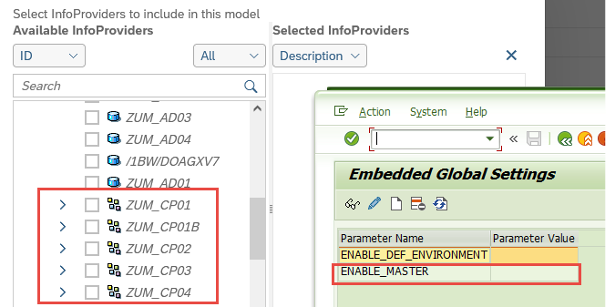
Sie müssen das Kennzeichen nur für den Wechsel des Modells entfernen. Für den Transport und im Zielsystem brauchen Sie das Kennzeichen nicht zu entfernen.

Achtung, denken Sie daran, das Flag zum Aktivieren von Stammdaten zu setzen, bevor Sie ein Datenzugriffsprofil ändern!!

Wenn Sie das Datenzugriffsprofil mit entferntem „enable_master“ eingeben, werden alle Modelle mit Stammdaten aus dem Profil gelöscht!

Fazit

BPC über SAC funktioniert hervorragend. Lediglich ein paar kleine Probleme können etwas Aufwand verursachen, sind aber lösbar.


Erstellt im Juni 2024

Data Products Setup

I’ll start with Data Products setup. If you’re new to the concept, this recent video is a great starting point, but here’s a short summary. A data product is a well-described, easily discoverable, and consumable collection of data sets.

Creating a Data Product in Datasphere

Note that in this article I create Data Products in the Data Sharing Cockpit in Datasphere. This functionality is expected to move into the Data Product Studio, but that had not taken place at the time writing.

Before creating a Data Product in Datasphere, I need to set up a Data Provider profile, collecting descriptive metadata like contact and address details, industry, regional coverage, and importantly define Data Product Visibility. Enabling Formations allows me to share the Data Product with systems across your BDC Formation – Databricks, in this case.

With the Data Provider set up, I can go ahead and create a Data Product. As with the Data Provider, I’ll need to add metadata about the product and define its artifacts – the datasets it contains. Only datasets from a space of SAP HANA Data Lake Files type can be selected. Since this Data Product is visible across the Formation, it is available free of charge.

For this demo, the artifact is a local table containing ten years of Ice Cream sales data. Since this is a File type space, importing a CSV file directly to create a local table isn’t an option (see documentation).

I used a Replication Flow to perform an initial load from a BW aDSO table into a local table.

Once Data Product is created and listed, it becomes available in the Catalog & Marketplace, from where it can be shared with Databricks by selecting the appropriate connection details.

Jump into Databricks

To use the shared object In Databricks, I need to mount it to the Catalog – either by creating a new Catalog or using an existing one.

Databricks appends a version number to the end of the schema – ‘:v1’ – to maintain versioning in case of any future changes to the Data Product.

Once the share is mounted, the schema is created automatically, and the Sales actual data table becomes available within it. From there, I can access the shared table directly in a Notebook.

Creating a Data Product in Databricks

To create a Data Product in Databricks, I first need to create a Share – which I can either do via the Delta Sharing settings in the Catalog:

Or directly out of the table which is going to become a part of the Share:

Since a single Share can contain multiple tables, I have the option to either add the table to an existing Share, or create a new one:

To publish the Share as a Data Product, I run a Python script where I define the target table for the forecast and describe the Share in CSN notation, setting the Primary Keys. Primary Keys are required for installing Data Products in Datasphere.

Jump back into Datasphere

Once the Databricks Data Product is available in Datasphere, I install it into a Space configured as a HANA Database space – since my intention is to build a view on top of the table and use it for planning in SAC.

There are two installation options: as a Remote table for live data access, or as a Replication Flow, in which case the data is physically copied into the object store in Datasphere.

Since I want live access, I install it as a Remote Table:

and build a Graphical view of type Fact on top:

Forecast calculation

With my Data Products set up and Sales actual data are available in Databricks, I create a Notebook to calculate the Sales Forecast.

The approach combines Sales and Weather data to train a Linear Regression model. I import the Weather data *https://zenodo.org/records/4770937 from an external server directly into Databricks, select the relevant features from the weather dataset, and combine them with the Sales actual data:

* Klein Tank, A.M.G. and Coauthors, 2002. Daily dataset of 20th-century surface
air temperature and precipitation series for the European Climate Assessment.
Int. J. of Climatol., 22, 1441-1453.
Data and metadata available at http://www.ecad.eu

Using the “sklearn” library, I build and train a Linear regression model:

Once trained, the model predicts the Sales forecast for Rome in June 2026 based on the weather forecast, and I save the results to my Catalog table:

Seamless planning data model

Seamless planning concept is built around physically storing planning data and public dimensions directly in Datasphere, keeping them alongside the actual data.

Since the QRC4 2025 SAC release, it has also been possible to use live versions and bring reference data into planning models without replication.

In this scenario, I build a seamless planning model on top of the Graphical view I created over the Remote table. This lets me use the forecast generated in Databricks as a reference for the final SAC Forecast version.


The model setup follows these steps:

Create a new model:

Start with data:

Select Datasphere as the data storage:

From there, I define the model structure and can review the data in the preview.

For a deeper dive into Seamless Planning, I recommend this biX blog.

Process Flow automation

Multi-action triggers Datasphere task chain

The final step is automating the entire forecast generation by using SAC Multi-actions and a Task-Chain in Datasphere – so that my user can trigger the calculation with a single button click from an SAC Story.

The model setup follows these steps:

Create a new model:

Triggering Task Chains from Multi-actions is a recent release. This blog post walks through how to set it up.

For details on how to trigger a Databricks Notebook from Datasphere, I recommend referring to this blog.

With everything in place, I create a Story, add my Seamless planning Model, and attach the Multi-action:

Running the Multi-action triggers the Task Chain, which in turn triggers the Databricks Notebook.

I can monitor the execution details in Datasphere:

and in Databricks:

Once the calculation completes, the updated forecast appears in the Story:

The end-to-end calculation took 2 minutes 45 seconds in total. The Task Chain in Datasphere is triggered almost instantly by the Multi-action, the Databricks Notebook execution itself took 1 minute 29 seconds, with the remaining time spent on Serverless Cluster startup.   


From here, I can copy the calculated forecast into a new private version:

adjust the numbers as needed, and publish it as a new public version to Datasphere:

Conclusion

With SAP Business Data Cloud, it is possible to build a forecasting workflow that feels seamless to the end user — even though it spans multiple systems under the hood.

Companies using BW as the main Data Warehouse and Databricks for ML calculations or Data Science tasks can benefit from using the platform, as the data no longer needs to be physically copied out of BW.

What this scenario demonstrates is that once wrapped as a Data Product, BW sales data can be shared with Databricks via the Delta Share protocol. Databricks, in turn, can then create its own Data Products on top of the calculation results and share them back with Datasphere as a Remote Table.

A Seamless Planning model in SAC sits on top of that Remote Table, giving planners live access to the generated forecast. A single Multi-action in an SAC Story ties it all together, triggering a Datasphere Task Chain that kicks off the Databricks Notebook — completing the full cycle in under three minutes.

As SAP Business Data Cloud continues to mature, scenarios like this one are becoming achievable – leaving the complexity in the architecture and not in the workflow.

Ansprech­partner

Ilya Kirzner
Consultant
biX Consulting
Datenschutz-Übersicht

Diese Website verwendet Cookies, damit wir dir die bestmögliche Benutzererfahrung bieten können. Cookie-Informationen werden in deinem Browser gespeichert und führen Funktionen aus, wie das Wiedererkennen von dir, wenn du auf unsere Website zurückkehrst, und hilft unserem Team zu verstehen, welche Abschnitte der Website für dich am interessantesten und nützlichsten sind.